MUMRO · AI app for brand content, publishing and comments

Create, schedule and replywith AI that knows your brand.

MUMRO is one app where you create content with AI, schedule and publish it to social channels and your website, reply to comments and track results — all built on brand knowledge you save once.

For companies, creators, editorial teams and agencies.

Watch the 30-second film
Social channels
  • Facebook
  • Instagram
  • LinkedIn
  • X
  • YouTube
  • TikTok
Website & blog
  • WordPress
  • Your own CMS (API)
The real appOne shared queue: 378 scheduled posts, Reels and Shorts across Facebook, Instagram and YouTube.
01Brand memory
Strategy, voice and sources saved once

Every draft, reply and AI agent starts from your approved rules and facts.

02AI content
Articles, carousels and posts

Turn one topic into a full campaign with a version for every format.

03Publishing
One calendar for social and website

Schedule and publish to six social channels, WordPress or your CMS.

04Comments & agents
Replies, website chatbot and MCP

Answer your audience in your voice and work from Claude, ChatGPT or Cursor.

The problem MUMRO solves

Your brand’s content lives in eight places at once.

The plan sits in a spreadsheet, the brand voice in a document, AI in a separate chat, images in folders, publishing in several dashboards, comments in more inboxes and results in reports nobody connects. Every hand-off loses context — and time.

Without MUMRO

  • A spreadsheet with the publishing plan
  • A brand document your AI never sees
  • An AI chat you re-brief from scratch every time
  • Folders of images and endless file versions
  • Separate Facebook, Instagram, LinkedIn, X, YouTube and TikTok dashboards
  • Your website CMS in yet another tab
  • Comments and visitor questions spread across inboxes
  • Statistics in several unconnected reports

With MUMROOne app. One brand context.

  • Strategy and brand voice are written once — every draft, reply and AI agent uses them.
  • An article, a carousel and social posts come from one topic, with a variant for every channel.
  • One calendar for social channels and your website, with a separate status for each publication.
  • Comments, website chat and results feed straight into the next content plan.

How MUMRO works

Four steps from brand knowledge to results.

  1. Describe your brand once

    Save your strategy, goals, audience, brand voice, words to avoid and trusted sources. This is the memory every part of MUMRO works from.

    • Strategy
    • Brand voice
    • Sources
  2. Create with AI

    Turn one topic into a website article, a carousel and social posts. AI writes in your voice and shows which sources it used. You edit and approve.

    • Articles
    • Carousels
    • Posts
  3. Plan and publish

    Pick a date or an automatic slot, choose channels and publish to Facebook, Instagram, LinkedIn, X, YouTube, TikTok and WordPress. Each channel keeps its own version and status.

    • Calendar
    • Queue
    • Time slots
  4. Reply and learn

    Answer comments with AI suggestions, handle visitor questions with a website chatbot and review social and website analytics. Findings shape the next version of your strategy.

    • Comments
    • Chatbot
    • Analytics

Brand memory in practice

One brand knowledge. Every format.

Click a source on the left to see what AI works from. Pick a format on the right to see the finished content.

Your brand memory. Every channel & CMS.

MUMRO / BRAND INTELLIGENCE
Shared context

The whole brand. In every piece.

Strategy, voice, product knowledge and audience feedback work together — across Instagram, Facebook, LinkedIn, X and your website.

Strategy

A clear purpose for every piece.

MUMRO uses your goal, audience and content pillars to guide the topic and next step. The team and AI work in the same direction.

Brand voice

Your voice carries across channels.

Keep your language, tone and boundaries available to every draft, article and reply. Less explaining and correcting the same things.

Research

Content with a foundation.

Bring product knowledge and selected sources into the brief. Keep facts connected to their origin as you develop the content.

Conversations

Questions become your next useful topic.

MUMRO connects audience conversations with brand knowledge. Recurring questions can guide new content and useful replies.

Analytics

Results inform the next decision.

Compare content performance, website traffic and audience reactions. Use the findings to choose a concrete next test.

Content & media

Build on what you already have.

Keep approved images, articles and brand assets together. Reuse the right material across formats and publications.

Brand memory↻ Results feed the next idea
All six sources inform every format.Explore the brand context. Pick a format. See the content.

WHAT MUMRO CREATES

Same direction. Every social channel.

The packing idea stays the same. MUMRO adapts the opening, length and next step for Instagram, Facebook, LinkedIn and X.

Explore the publication
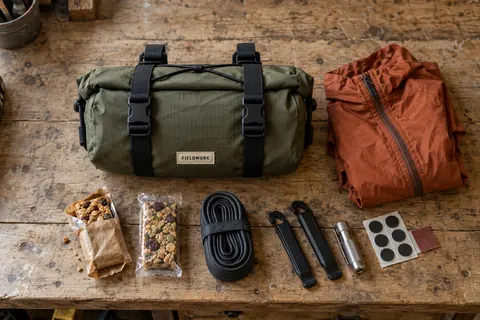
DRIFT 4L with a jacket, snacks and a repair kit ready to pack.

Two days. No backpack.

Four litres for a jacket, snacks and a repair kit. DRIFT 4L carries them on your bars. Check the fit for your bike — and make room for a short escape.

Strategy + brand voice + product facts

WHAT MUMRO CREATES

Ready for WordPress or your own CMS.

MUMRO develops the topic into a complete article for your website, ready to publish via WordPress or your own custom CMS API.

Explore the website tools
DRIFT 4L mounted between the levers of a gravel bike.

A weekend with DRIFT 4L: pack, mount, ride.

Start with what you need for two days. Then check the space between your levers and above your tyre. Here is how to prepare for the first ride.

Product sources + rider questions + strategy

WHAT MUMRO CREATES

The same knowledge, in every reply.

A question arrives under a post or on your website chat. MUMRO prepares a reply from your brand knowledge — automatically or for your review.

Explore publishing & replies
DRIFT 4L with a jacket, snacks and a repair kit ready to pack.

“Will it fit between my levers?”

Measure the clear space between your levers and compare it with the bag dimensions. Check tyre clearance too. Send us those measurements and we can help.

Audience question + product knowledge + brand voice

NARRATED VIDEO WALKTHROUGH · 30 SECONDS

See in half a minutewhat MUMRO is.

Two short narrated films with captions explain how the system works: from the live application interface and brand memory to safe collaboration with AI agents via MCP.

Scenes & timestamps (click to jump)

Explore the interactive workspace below
mumro·studioLIVE UI + MOTION🔊 Voiceover EN · 1080p
FILM 01 · 16:9

How MUMRO connects brand strategy, publishing and AI agents in one place

mumro·studioEDITORIAL MOTION🔊 Voiceover EN · 1080p
FILM 02 · 16:9

Less starting from scratch — one brand context across every channel

What exactly MUMRO does

Every feature, in plain words.

No guessing. This is what you get in the app, grouped the way a content team actually works.

Strategy & brand memory

  • Strategy: goals, audience, content pillars and the role of each channel
  • Brand voice: tone, vocabulary, rules and boundaries
  • Source profiles: RSS feeds, official websites and web search
  • Strategy versions updated from real results

AI content creation

  • Post and post-series generator in your brand voice
  • Carousels generated from a topic or an article
  • Website articles with research and source checks
  • Images, covers and a slide pack made from an article
  • Article translations into further languages

Planning & publishing

  • Composer: a post, story, reel or video to many channels at once
  • Separate copy and media for every platform
  • Calendar, queue, recurring schedules and automatic slots
  • Publishing history with links and content reuse
  • Facebook, Instagram, LinkedIn, X, YouTube, TikTok, WordPress and your own CMS via API

Comments, conversations & website

  • One inbox for social comments and website chatbot conversations
  • AI reply suggestions, reply templates and auto-reply policies
  • Website chatbot with your brand knowledge base and lead capture
  • Link in bio page and customer testimonials

Analytics & insights

  • Dashboard with publications, alerts and today’s tasks
  • Social analytics: reach, reactions and top posts
  • Website analytics: page views, visitors and sessions
  • Insights: best times, hashtags and content worth reusing
  • Campaigns and UTM links

Team, AI agents & control

  • Separate workspaces for brands and clients
  • Team roles and access to selected channels only
  • AI modes: drafts only, approval before publishing or scheduling within limits
  • AI budgets and cost limits, including your own API keys (BYOK)
  • MCP server and API for Claude, ChatGPT and Cursor; webhooks

Who MUMRO is for

For teams that publish regularly — and have had enough of the chaos.

Companies & expert brands

Your situation
You have a product or service, a website and a few social channels — but little time for consistent content.
What changes
One weekly topic becomes an article, a carousel and posts. A website chatbot answers customer questions using your knowledge.

Creators & small teams

Your situation
You publish on several profiles and do most of the work yourself.
What changes
One calendar, ready variants for each channel and every comment in one place — no copying between apps.

Editorial teams & topic portals

Your situation
You work from sources and can’t afford mistakes.
What changes
Source profiles, research for each article, traceable facts and distribution to social channels.

Agencies & freelancers

Your situation
You run content for several brands at once.
What changes
A separate workspace, brand voice and accounts for every client, with roles and channel-level access.

WHAT YOU GAIN WITH MUMRO

Less starting over.More work that adds up.

Your strategy does more than sit in a document. It guides content, conversations and the next decision. Explore what that changes in your everyday work.

mumro·Brand memory

Shared knowledge

StrategyBrand voiceApproved sources
Every draft starts with your brand

One direction across channels and your team.

01 / YOUR BENEFIT

Explain your brand once.

MUMRO keeps your positioning, tone and sources together. Your team and AI start from the same knowledge, so you spend less time repeating the brief and correcting the voice.

Explore brand context
Świadek Dziejów: from strategy v7 and sources to website articles and social
Walkthrough steps (real MUMRO app)
  1. Approved Świadek Dziejów strategy v7 (100% readiness) and content pillars.
  2. Verified historical sources and configured brand voice rules.
  3. Website article autopilot and coordinated multi-channel social post generator.
02 / YOUR BENEFIT

Give a good idea a longer life.

Develop one subject into an article, a carousel and channel-specific posts. MUMRO keeps the message connected while adapting the opening, depth and next step.

Try the content studio
Świadek Dziejów: 378-item queue and shared 3-channel calendar
Walkthrough steps (real MUMRO app)
  1. Shared queue: 378 scheduled Reels, Shorts and posts across IG, FB and YouTube.
  2. Calendar view showing daily publishing slots across all three platforms.
  3. History of 1,610 published pieces and clear slot status tracking.
03 / YOUR BENEFIT

Know what goes out next.

Keep drafts, media, approvals and schedules in one plan. Each channel follows its own rhythm, and the team sees the next step without piecing together separate lists.

Explore the publishing plan
mumro·Conversations

Questions across your channels

Social commentsWebsite chatBrand knowledge
A useful answer in your voice

Reply rules define what AI handles and what you review.

04 / YOUR BENEFIT

Turn questions into better marketing.

MUMRO prepares replies from your brand’s knowledge. Keep control over sensitive conversations, and use recurring questions as a starting point for useful new content.

Explore replies and conversations
mumro·Website + insights

One connected brand

CMS articlesWebsite chatSocial & website results
The same knowledge, beyond social

From a social post to an article and a useful conversation.

05 / YOUR BENEFIT

Bring your website into the plan.

MUMRO connects CMS articles, website chat and contacts with your social work. Read website visits alongside content results, and use the findings to choose the next useful topic.

Explore your website tools
Świadek Dziejów: 288.8k views analytics, MCP context and reply approval
Walkthrough steps (real MUMRO app)
  1. Świadek Dziejów dashboard: 288.8k views, 24.7k followers across 3 connected channels.
  2. Performance analytics and optimal publishing slots shared with your agent via MCP.
  3. AI-drafted comment replies with a safe human approval gate.
06 / YOUR BENEFIT

Let AI do the legwork.

Use MCP to give your AI access to brand context and content tools. Prepare a draft, review the result and confirm a slot. Your rules, budgets and approvals stay in MUMRO.

Try the AI chat

MUMRO / CONTENT STUDIO

One idea. A whole campaign.

MUMRO turns your brand knowledge into a coherent campaign. Keep the facts and point of view. Give each channel its own opening, format and next step.

mumro·Content studioArticle
DRIFT 4L mounted between the levers of a gravel bike.
Cycling Escapes / JOURNAL

Two days. Four litres. Where do you start?

Before the first kilometre, check three things: space at the levers, clearance above the tyre and cable routing.

Read the full story ↗

Pack what you reach for.

A jacket, snacks and a repair kit. Keep the load compact and the essentials close.

Fit before you ride.

Compare the bag dimensions with the clear space at your bars. Tighten the straps and check the tyre clearance.

MUMRO / Content studio

Your expertise, ready for your website.

MUMRO uses sources and audience questions to prepare a complete article. Review the content, then send it to your connected CMS.

The same brand context
  • Approved facts
  • Brand voice
  • Audience questions
Why this matters

Your channels share the same approved facts. The expression changes, so the campaign stays coherent without repeating the same text everywhere.

See the AI chat prepare the post ↗
mumro·Content studioCarousel
DRIFT 4L with a jacket, snacks and a repair kit ready to pack.Cycling Escapes / 01
DRIFT 4L / 1—5

Two days. No backpack.

A jacket. Snacks. A repair kit. Four litres for a small escape.

DRIFT 4L with a jacket, snacks and a repair kit ready to pack.Cycling Escapes / 02
DRIFT 4L / 2—5

Pack for the way you ride.

Start with the essentials. Keep the items you reach for close.

DRIFT 4L mounted between the levers of a gravel bike.Cycling Escapes / 03
DRIFT 4L / 3—5

Look at your handlebars.

Measure the clear space between your levers. Give cables room.

DRIFT 4L mounted between the levers of a gravel bike.Cycling Escapes / 04
DRIFT 4L / 4—5

Check the space above the tyre.

Mount the bag, tighten the straps and check clearance.

A gravel rider carrying DRIFT 4L on a quiet countryside track.Cycling Escapes / 05
DRIFT 4L / 5—5

Make room for the weekend.

A good fit. A compact load. Your next short escape.

MUMRO / Content studio

Develop the idea, slide by slide.

See how MUMRO gives one topic a visual structure. Click through five slides: the facts stay connected, and each frame adds something useful.

The same brand context
  • Approved facts
  • Brand voice
  • Audience questions
Why this matters

Your channels share the same approved facts. The expression changes, so the campaign stays coherent without repeating the same text everywhere.

See the AI chat prepare the post ↗
mumro·Content studioSocial post
Cycling EscapesInstagram
DRIFT 4L with a jacket, snacks and a repair kit ready to pack.

Two days. No backpack. A jacket, snacks and a repair kit — DRIFT 4L keeps the essentials on your bars. Check lever space and tyre clearance before the first ride. What earns a place in your weekend kit? #gravel #bikepacking #DRIFT4L

Take this story into MUMRO ↗

MUMRO / Content studio

Your voice. Each channel’s language.

Choose a channel and inspect the result. MUMRO adapts the opening and next step; the context lens shows how your knowledge informs the text.

The same brand context
  • Approved facts
  • Brand voice
  • Audience questions
Why this matters

Your channels share the same approved facts. The expression changes, so the campaign stays coherent without repeating the same text everywhere.

See the AI chat prepare the post ↗

Inside MUMRO · 6 key screens

See how strategy, creation, publishing and AI work in one place.

Instead of switching between separate tools for notes, graphics, scheduling, CMS and analytics, you work in a single workspace built on your brand memory.

Świadek Dziejów · live workspace data
Scheduled & published
378 itemsPosts, Reels, Shorts, carousels & articles in one workspace
Connected channels
6 social + CMSFacebook, Instagram, YouTube, TikTok, LinkedIn, X & WordPress
Workspace isolation
Separate memoryOwn strategy, voice rules, media library and permissions per brand
01Workspace & daily status

One dashboard for channels, today’s queue and brand workspaces

Here you see connected social accounts and websites, publications waiting for review, and alerts that need a decision today — without mixing brands or clients.

  • Separate workspaces keep brand memory, connected channels, team permissions and audit logs isolated for every brand or client.
  • Daily operational view shows what is scheduled next, which drafts wait for approval, and whether any channel token or job needs attention.
  • Direct shortcuts jump straight to pending drafts, new comments or the weekly strategy audit.
Format coverage
Social + WebPosts, carousels, Reels/Shorts and long-form CMS articles
Media & subtitles
Images, MP4, SRTBuilt-in visual studio, cover frames and caption tracks
First comment link
Auto-attachedConnect a website article URL to the first social comment
02Composer · social & CMS

Turn one topic into channel-ready posts, carousels, video and SEO articles

In the Composer you prepare platform-specific captions, visual slides, video covers, SRT subtitles and full website articles from the same verified brand context.

  • Create separate variants for Instagram, Facebook, LinkedIn, X, YouTube and TikTok alongside an SEO article for WordPress or your custom CMS.
  • Attach approved visuals, video covers, subtitle tracks and an optional first comment with an article link before scheduling.
  • Every draft stays linked to your active brand strategy and source materials so claims remain consistent across social and web.
Queue volume
378 publicationsVerified on the Świadek Dziejów history channel
Execution gate
Human approvalPrepare → confirm flow before publishing or rescheduling
Delivery tracking
Live job statusClear status and retry control for every target account
03Shared queue & calendar

One shared publishing plan across all social channels and your website

Here you inspect the entire calendar and queue — 378 publications on the Świadek Dziejów profile — with live statuses, time slots and safe rescheduling.

  • Filter the queue by channel, format or status: draft, scheduled, published or needing a retry.
  • Check cadence and slot collisions before moving a publication or confirming a batch schedule.
  • Every scheduled item shows which strategy version and media assets it uses before anything goes live.
Inbox scope
Comments + Web chatSocial comment threads and website chatbot conversations
Reply grounding
Brand memoryUses approved facts, FAQ and voice boundaries
Safety gate
Confirm before sendDraft replies wait for approval according to workspace rules
04Unified comments & chatbot inbox

Reply to social comments and website chatbot questions in your brand voice

All audience comments from social channels and conversations from the embedded website chatbot arrive in one inbox with AI reply drafts grounded in your knowledge base.

  • One list of social media comments and website chatbot threads with status tracking (new, needs review, answered).
  • AI suggests replies using verified product facts and tone rules — without inventing promises or prices.
  • You review, edit and confirm replies manually, or set clear moderation rules for recurring questions.
Measured reach
288.8k viewsTotal views recorded on the Świadek Dziejów profile
Cross-channel view
Social + WebsiteChannel metrics paired with first-party web analytics
Actionable loop
Strategy v2 draftInsights flow straight into the next content plan
05Performance → next strategy

Analytics and AI insights that turn results into the next strategy version

Instead of raw charts left without follow-up, MUMRO connects social performance (288.8k views on Świadek Dziejów) and website traffic with concrete recommendations for what to publish next.

  • Compare reach, engagement and format performance across channels alongside website visits and article reads.
  • Dashboard Audit highlights which topics, hooks and posting windows outperformed the baseline.
  • Turn findings directly into a new strategy draft (`create_content_strategy_draft`) for the upcoming cycle.
MCP toolset
31 live toolsRead context, create drafts, upload media & prepare actions
Compatible clients
Claude, ChatGPT, CursorStandard Model Context Protocol with workspace auth
Control boundary
Prepare → ConfirmAI prepares the work; you approve every public action
06AI assistant with guardrails

Work from Claude, ChatGPT or Cursor on live MUMRO tools via MCP

Connect your favorite AI assistant through the official MCP server: it reads your strategy, checks performance, prepares drafts in MUMRO and stops at the human confirmation gate.

  • 31 MCP tools give your assistant structured access to brand strategy, media uploads, article drafts, queue slots and analytics.
  • No more pasting brand briefs into every new chat window — the assistant reads the current workspace context directly.
  • Publishing, scheduling and comment replies require an explicit `prepare` → `confirm` step approved by a human.

AI agents & MCP

From your AI chat to your publishing plan.

Ask your AI to prepare a post. Through MCP, it uses the strategy, brand voice and media in MUMRO. Review the proposal, approve the time and see the post in your plan.

PLUGIN

MUMRO inside your AI tool.

The plugin brings MUMRO tools and skills into your working environment. Brand context, assets and the task result remain in MUMRO.

SKILLS

The workflow matters.

Skills guide performance analysis, campaign planning and content preparation. They account for sources, permissions and automation boundaries.

MCP

Context and concrete actions.

AI reads the strategy, creates a draft and prepares a time through MUMRO tools. Confirmation turns the proposal into a scheduled publication.

Your AI chatMUMRO · MCP
You

Create an Instagram post showing what fits in DRIFT 4L. Use our brand voice and product visual. Find the next slot and show me the post before scheduling.

Choose a brief to begin.

AI assistant

I have the campaign context.

Cycling Escapes’s approved strategy v2: packing, bike fit and workshop details. Instagram is connected. I will use the approved DRIFT 4L visual from your library.

Read brand contextSee the MCP calls
get_content_strategy({ account_id: 1701 })
→ approved: v2 · DRIFT 4L

list_channels({})
→ Cycling Escapes · Instagram · ready
AI assistant

The post is saved in MUMRO.

I wrote the content using the brand voice and created an editable draft with the product visual. It is ready to review.

Create a draftSee the MCP calls
create_publication_draft({
  publication_type: "post",
  targets: [{ account_id: 1701, platform: "instagram" }],
  strategy_id: 301,
  caption: "…",
  media_asset_ids: [901],
  idempotency_key: "drift-4l-post-1"
})
→ publication_id: 501 · status: draft
AI assistant

Here is the proposed publication.

I checked the next slot and prepared the scheduling action. Review the exact post, channel and time before confirming.

Prepare the scheduleSee the MCP calls
preview_schedule({
  account_id: 1701, content_type: "post"
})
→ next_slot_at: "2026-10-17T16:00:00Z"

prepare_publication_action({
  publication_id: 501, operation: "schedule_draft",
  scheduled_at: "2026-10-17T16:00:00Z",
  strategy_id: 301,
  idempotency_key: "drift-4l-schedule-1"
})
→ confirmation_mode: user · status: prepared
You

Approved. Schedule this post on Instagram, Next slot · Thu, 18:00.

AI assistant

Scheduled on Instagram, Next slot · Thu, 18:00. You can find and edit it in MUMRO.

Confirm the actionconfirm_publication_action
confirm_publication_action({
  action_id: 601,
  confirmation_phrase: "[phrase from prepared action]"
})
→ execution_status: scheduled
→ publication_id: 501
Active MUMRO skills & safety gatesMCP · 32 tools
  • mumro-content-intelligenceStrategy & retained insightsRead-only memory
  • mumro-plan-campaignPillars, cadence & slotsApproved strategy v2
  • mumro-publish-contentDrafts & scheduling gateprepare → confirm
  • mumro-manage-queueQueue & recovery controlIdempotency key
mumroCycling Escapes

The chat writes the content. MCP gives it access to the brand context, drafts and scheduling tools in MUMRO.

MUMRO / CONTEXT FOR YOUR AI

Strategy and brand voiceSources and approved mediaChannels and time slots

Send a brief. See the draft. Review the content and confirm a slot.

Review the post

Awaiting your approval
DRIFT 4L with a jacket, snacks and a repair kit ready to pack.Product visual · approved

Europe/Warsaw

MUMRO / publishing plan

Scheduled

Instagram

Two days. Four litres. A jacket, snacks and a repair kit — all on your bars, instead of your back. DRIFT 4L keeps a short escape compact. Check the fit for your bike and head out for the weekend. #CyclingEscapes #DRIFT4L #gravel

Scheduled

The same post appears in your brand workspace.

This campaign requires your approval. With delegated scheduling, the agent works within the strategy’s approved rules.

Connection details

MCP & API

Connect an authorised agent to the brand’s working context. Grant the tools and access its task needs.

Workspace scope

Keep context and actions within the selected brand and its permissions.

Confirmation & delegation

Review an action or delegate scheduling under an approved strategy.

Events & jobs

Follow publishing jobs and send workspace events to a configured webhook.

Control over AI

You set the direction.

Choose what to delegate, where work can go and when a person steps in. Your rules stay part of the process.

Drafts

Prepare ideas and materials. You decide what moves forward.

An article, carousel and post stay ready for review. Nothing is added to the publishing queue.

Confirm the plan

Review the proposed content and schedule before it enters the queue.

Three pieces are ready for content and time confirmation.

Delegate scheduling

Let approved work enter the schedule within the rules you set.

Approved pieces follow the permitted channels and publishing schedule.

Cycling Escapes / campaign rules

Frequently asked questions

Questions before you start.

01

What exactly is MUMRO?

A web app for running your brand’s communication in one place. You save your strategy and brand voice, create articles, carousels and posts with AI, schedule and publish them to social channels and your website, reply to comments and review results.

02

Is it just another post scheduler?

No. Planning and publishing are the core, but MUMRO also covers strategy and brand memory, AI content creation, website articles, comments, a website chatbot, analytics and work with AI agents. Every part uses the same brand knowledge.

03

Which channels can I publish to?

Facebook, Instagram, LinkedIn, X, YouTube and TikTok, plus your website through WordPress or your own CMS via API. Each channel gets its own copy and media, and every publication has its own status. We connect and test the channels and CMS integrations required for your workflow during the first week of the pilot.

04

Will AI publish anything without my approval?

Not unless you allow it. Choose a mode: drafts only, approval before publishing, or scheduling within limits you set — channels, cadence, budget and quiet hours. You can stop delegated work at any time.

05

How does AI know how my brand writes?

From brand memory: the strategy, brand voice, rules and trusted sources you save once. Every draft, comment reply and AI agent starts from the same knowledge, and for articles you can see which sources were used.

06

Can I use MUMRO from Claude, ChatGPT or Cursor?

Yes. The MCP server and API give your AI assistant access to brand context, drafts and the plan — within the permissions you grant. The agent prepares a proposal; you confirm the date.

07

Can an agency run several clients?

Yes. Each brand or client has a separate workspace with its own strategy, voice, accounts and conversations. Roles and channel-level access decide who can view, create and manage.

08

How much does it cost and how do I start?

MUMRO is available to selected brands, creators and teams in a Concierge model: we start with a live demo, then run a 30-day pilot tailored to your workflow. Scope and price are agreed individually. Click “Book a demo” or email stuczynski.g@gmail.com.

How we start · 30-day Concierge pilot

From the first call to working content in 30 days

We set up your brand memory, sources and approval rules together. You switch on automation only once you can see it works.

  1. Week 1Brand memory & channels

    We connect your social accounts and website, sort your sources by reliability and approve the first version of your strategy.

  2. Week 2First content & plan

    First source-backed articles, visuals and a 7-day publishing plan across all your channels.

  3. Week 3Comments & AI agents

    Recurring audience questions become new topics, and we connect your AI assistant (Claude, ChatGPT or Cursor) via MCP.

  4. Week 4Results after 30 days

    We compare views and website visits, and the findings go into the second version of your strategy.

Product documentation · PDF

MUMRO Platform Handbook (2026)

A full description of MUMRO features, everyday workflows, roles, integrations and AI agents — useful before a demo or when presenting MUMRO to your team.

Open Platform Handbook (PDF)

Your next move · Invite-only access

Your brand. One connected system.

MUMRO is currently available to selected brands, creators and teams. Tell us in detail what you do, what you are building and how we could work together — we will schedule a live demo and tailor the setup.

Direct contact & RolePlayingTech

Write to us with a thorough description of your project to book a MUMRO demo, or visit RolePlayingTech to see our other projects and custom AI & automation services.

MUMRO / RolePlayingTechInvite-Only Access · Partner Onboarding

Let’s see how we can work together.

MUMRO is currently available to selected brands, creators and editorial teams. Instead of open self-serve sign-ups, we work directly with each partner — starting with a live demo and tailoring the system to your workflow.

Direct Contact · Demo & Access

Tell us as much as possible about what you do and what you are building

If you want to use MUMRO, book a live walkthrough or explore working together, write to us in detail. The more context you share upfront, the better we can prepare a tailored demo and propose the right collaboration model.

What to include in your email:

  • What you do, what brand, product or project you are building, and who your audience is.
  • How your content and publishing workflow looks today (website, social channels, team) and where you lose the most time.
  • How we could work together — whether you are looking for MUMRO access, a guided pilot, or custom automation and AI tools.
Email stuczynski.g@gmail.com
Behind MUMRO · Projects & Services

Explore more at RolePlayingTech

MUMRO is developed by RolePlayingTech. Visit our site to read the story behind the platform, see our other projects, and check how else we can help — from custom workflow automations (n8n and code) and practical AI content pipelines to building dedicated software from scratch.

Visit roleplayingtech.com

Write directly to stuczynski.g@gmail.com or explore our projects and services at roleplayingtech.com.